
Free Meta Ads Glossary
Your Meta Ads Manager is talking;
do you know what it’s saying?
Understanding your data = better decisions = more sales, leads, and less wasted budget.
Two free Meta Ads glossaries, one for ecommerce brands and one for service businesses. Each one breaks down every key metric: what it means, what’s worth paying attention to, and what to do if something’s not working.

Choose your glossary
E-commerce and service-based businesses run completely different campaigns, serving up different data to analyse.
That’s why there are two glossaries.
Service Business Edition
For Service Businesses
If you’re focused on leads, cost per lead, and booking calls, start here.
E-commerce Edition
For e-commerce brands
If you’re tracking add to cart, Conversion Rate, and ROAS, this one’s for you.
Most founders have no idea if their Meta ads are working.
Not because they’re not smart enough, but because no one’s ever explained it properly.
If you’ve ever stared at your Ads Manager and thought, “Is that a good ROAS?”, “What even is CPM?” or “Why am I not getting any sales?”
This glossary is for you.
Your Meta Ads data is telling you a story of what’s working, what’s broken, and where you’re losing money. You just need to know how to read the data properly.
Sound familiar?
“I feel like we just threw money at Meta Ads and have no idea if it actually did anything.”
As much as I love Meta Ads, the platform makes you want to tear your hair out. And something I see with almost every client I’ve worked with: your results will improve when you actually understand your data.
What’s inside
Why you will want this Glossary in your hot lil hands:
Break down the jargon with realistic benchmarks to compare your results against.
Every key ecommerce metric explained simply: CTR, ROAS, frequency, add to cart rate, conversion rate, AOV, and more.
Learn what each metric is telling you about your ads and your website, because sometimes it’s not the ads that are the problem; it can be your website itself.
Find out exactly what to do when a number isn’t where it should be and the practical next steps to improve.
You want to be the kind of founder who understands their numbers to make informed decisions and not one who just hopes for the best.
A short video walking you through how to set up your Ads Manager columns so the metrics that matter are front and centre every time you open it.
“Our ROAS more than doubled once we stopped reacting and started actually looking at the data properly.”Get The Glossary
Quick definitions
Meta Ads metrics, explained
A taste of what’s inside. The full glossaries include realistic benchmarks and what to do when a number isn’t where it should be.
What is ROAS (Return on Ad Spend)?
How much revenue you generate for every dollar spent on ads. EG: if your ROAS is 3, this means that for every $1 you spend, you’re getting $3 back.
What is CPM (Cost Per 1,000 Impressions)?
How much you are paying for every 1,000 times your ad is shown. This is the base cost of reaching your audience.
What are Landing Page Views (LPV)?
The number of times someone clicked your ad and your landing page actually loaded. This is different from link clicks; someone can click but leave before the page loads.
What is Add to Cart Rate (ATC Rate)?
The percentage of people who visited your landing page and added something to their cart. Calculated as: Add to Carts ÷ Landing Page Views × 100.
What is Conversion Rate (CVR)?
The percentage of people who clicked your ad and completed a purchase. Calculated as: Purchases ÷ Landing Page Views × 100.
What is Average Order Value (AOV)?
The average amount a customer spends per purchase. Calculated as: Total Revenue ÷ Number of Orders.

Who’s behind this?
Meet Kate — Meta ads specialist and founder of Slow Pour Marketing.
Kate works with conscious ecommerce brands in sustainable fashion, food and beverage, beauty, pets, and lifestyle who want to grow intentionally without burning budget on ads.
This glossary was created because she kept seeing the same thing: smart founders staring at their Ads Manager, not knowing what to do next.
Not because they were bad at business, but because no one had ever actually explained what they were looking at.
This is the resource Kate wished had existed when she first started running ads.
Case study
Campaign results for a pet brand
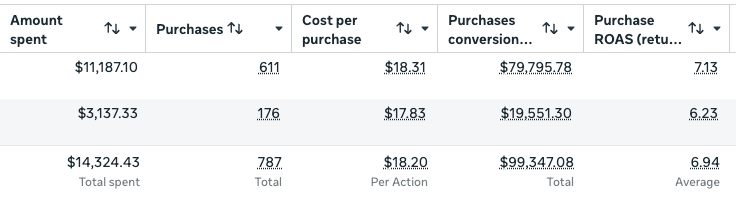
This is the guide you wish you had when you first started poking around in ads manager.
Download for free